SEO audit guide—your roadmap to finding the hidden issues silently killing your search rankings. Most websites have problems their owners don't know about. Crawl errors, slow pages, broken links, and indexing issues work against you while you wonder why traffic won't grow.
An SEO audit systematically examines your website to identify these problems. It's like a diagnostic checkup that reveals what's working, what's broken, and what's holding you back from ranking higher.
This guide walks you through a complete SEO site audit process. You'll learn what to check, which tools to use, and how to prioritize fixes that actually improve rankings. Whether you're auditing your own site or evaluating a client's, this framework ensures you catch the issues that matter.
What Is an SEO Audit?
An SEO audit is a comprehensive analysis of your website's search engine optimization health. It examines technical infrastructure, on-page elements, content quality, and off-page factors to identify issues affecting search visibility.
Why Regular Audits Matter
Websites accumulate problems over time:
- Technical issues emerge as sites grow and change
- Content becomes outdated or thin
- Broken links multiply as pages move or disappear
- Performance degrades as more elements load
- Algorithm updates change what's required for rankings
Regular audits catch problems before they compound. Most sites benefit from quarterly technical audits and annual comprehensive reviews.
What a Complete Audit Covers
A thorough SEO health check examines four areas:
- Technical SEO: Crawlability, indexing, site architecture, speed, mobile-friendliness
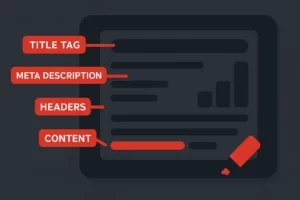
- On-page SEO: Title tags, meta descriptions, headers, content optimization, internal linking
- Content quality: Depth, relevance, freshness, duplicate content issues
- Off-page factors: Backlink profile health, toxic links, authority signals
This guide focuses primarily on technical and on-page auditing—the elements you control directly.
Essential Tools for SEO Auditing
Effective auditing requires the right tools. Here's what you need.
Free Tools
- Google Search Console: Essential for indexing data, crawl errors, and performance insights directly from Google
- Google PageSpeed Insights: Core Web Vitals and performance analysis
- Google Mobile-Friendly Test: Mobile usability verification
- Screaming Frog (free version): Crawls up to 500 URLs for technical issues
- Bing Webmaster Tools: Additional crawl and indexing insights
Paid Tools
- Screaming Frog (paid): Unlimited crawling with advanced features
- Ahrefs Site Audit: Comprehensive technical and backlink auditing
- SEMrush Site Audit: Detailed issue identification and tracking
- Sitebulb: Visual audit reports with prioritized recommendations
For most small business audits, Google's free tools plus Screaming Frog provide sufficient capability.
Step 1: Crawlability and Indexing Audit
If search engines can't crawl and index your pages, nothing else matters. Start here.
Check Robots.txt Configuration
Your robots.txt file tells search engines what they can access:
- Access your robots.txt at yourdomain.com/robots.txt
- Verify important pages aren't blocked
- Ensure you're not accidentally disallowing the entire site
- Check that XML sitemap location is specified
Common robots.txt mistakes include blocking CSS/JS files (hurting rendering) or accidentally blocking entire directories containing important content.
Verify XML Sitemap
XML sitemaps help search engines discover your pages:
- Confirm sitemap exists and is accessible
- Verify sitemap is submitted in Google Search Console
- Check that important pages are included
- Ensure sitemap doesn't include blocked or redirected pages
- Confirm sitemap updates automatically with new content
Review Index Coverage
Google Search Console's Index Coverage report reveals indexing status:
- Valid pages: Successfully indexed
- Valid with warnings: Indexed but with issues
- Excluded: Not indexed (intentionally or due to problems)
- Error: Failed to index due to issues
Investigate excluded and error pages. Some exclusions are intentional (duplicate pages, pagination), but errors need attention. Google's crawling and indexing documentation explains status codes in detail.
Identify Crawl Errors
Look for issues preventing crawling:
- Server errors (5xx) indicating hosting problems
- Redirect errors (redirect chains, loops)
- 404 errors for important pages
- Soft 404s (pages returning 200 but showing error content)
- Blocked resources preventing proper rendering
Step 2: Technical SEO Audit
Technical issues create barriers between your content and rankings.
Site Speed and Core Web Vitals
Core Web Vitals are Google's page experience metrics:
- Largest Contentful Paint (LCP): Loading performance—should be under 2.5 seconds
- Interaction to Next Paint (INP): Interactivity—should be under 200 milliseconds
- Cumulative Layout Shift (CLS): Visual stability—should be under 0.1
Test pages with PageSpeed Insights. Focus on:
- Image optimization (compression, proper sizing, modern formats)
- Server response time (TTFB under 200ms)
- Render-blocking resources
- JavaScript execution time
- Layout shifts from loading elements
Mobile Usability
Mobile-first indexing means Google primarily uses mobile version:
- Test with Google's Mobile-Friendly Test
- Check for viewport configuration
- Verify tap targets are adequately sized
- Ensure text is readable without zooming
- Confirm content parity between mobile and desktop
HTTPS and Security
Security affects rankings and user trust:
- Verify site uses HTTPS throughout
- Check for mixed content (HTTP resources on HTTPS pages)
- Confirm SSL certificate is valid and not expiring
- Test for security vulnerabilities if applicable
Site Architecture
Structure affects crawling and user experience:
- URL structure: Clean, descriptive, consistent URLs
- Click depth: Important pages within 3 clicks of homepage
- Navigation: Logical menu structure search engines can follow
- Internal linking: Adequate links between related content
Step 3: On-Page SEO Audit
On-page elements tell search engines what your pages are about.
Title Tags
Audit title tags for:
- Missing titles: Every page needs a unique title
- Duplicate titles: Each page should have distinct title
- Length issues: Keep titles under 60 characters to avoid truncation
- Keyword placement: Primary keyword near the beginning
- Brand consistency: Consistent brand placement across site
Meta Descriptions
Check meta descriptions for:
- Missing descriptions: Add descriptions to important pages
- Duplicate descriptions: Each page needs unique description
- Length issues: Keep under 155 characters
- Compelling copy: Descriptions should encourage clicks
- Keyword inclusion: Include relevant keywords naturally
Header Structure
Proper header hierarchy helps SEO and accessibility:
- Each page has exactly one H1
- H1 includes primary keyword and matches page topic
- Headers follow logical hierarchy (H2 under H1, H3 under H2)
- Headers aren't skipped (H1 to H3 without H2)
- Important keywords appear in subheadings
Image Optimization
Images need optimization for search and speed:
- Alt text: Descriptive alt attributes on all images
- File names: Descriptive, keyword-relevant file names
- File size: Compressed for fast loading
- Dimensions: Properly sized (not scaled in browser)
- Format: Modern formats (WebP) where supported
See our on-page SEO guide for comprehensive optimization strategies.
Step 4: Content Audit
Content quality directly impacts rankings and user engagement.
Identify Thin Content
Thin content provides little value and can hurt site quality:
- Pages with fewer than 300 words (unless appropriate for page type)
- Duplicate or near-duplicate content across pages
- Auto-generated or low-quality content
- Pages that don't satisfy search intent
Options for thin content: expand, consolidate, noindex, or remove.
Find Duplicate Content
Duplicate content confuses search engines about which page to rank:
- Internal duplicates: Same content at multiple URLs
- WWW vs. non-WWW: Both versions accessible
- HTTP vs. HTTPS: Both versions accessible
- Trailing slashes: URLs with and without trailing slashes
- Parameter URLs: Session IDs or tracking parameters creating duplicates
Fix with canonical tags, redirects, or proper URL parameter handling.
Assess Content Freshness
Outdated content loses relevance:
- Identify pages with outdated information
- Find content referencing old dates, statistics, or products
- Check for broken external links indicating neglected content
- Review evergreen content for update opportunities
Step 5: Link Audit
Internal and external links affect crawling, authority, and user experience.
Internal Link Analysis
Internal links distribute authority and guide users:
- Orphan pages: Pages with no internal links pointing to them
- Link distribution: Important pages should have more internal links
- Anchor text: Descriptive anchors that indicate linked content
- Broken internal links: Links to pages that no longer exist
- Redirect chains: Links pointing to redirects instead of final URLs
Broken Link Identification
Broken links hurt user experience and waste crawl budget:
- Find all 404 errors on your site
- Identify external links pointing to dead pages
- Check for broken images and resources
- Fix, redirect, or remove broken links
Backlink Profile Review
External links affect domain authority:
- Review referring domain quality
- Identify potentially toxic links
- Check for lost links to valuable pages
- Benchmark against competitors
Major backlink profile issues may require disavow file or active link building campaigns.
Prioritizing Audit Findings
Not all issues deserve equal attention. Prioritize effectively.
Critical Priority (Fix Immediately)
- Pages blocked from indexing that should be indexed
- Site-wide crawl errors
- Security issues (broken HTTPS, malware)
- Severe speed issues affecting all pages
- Major mobile usability problems
High Priority (Fix Soon)
- Missing or duplicate title tags on important pages
- Broken links to high-value pages
- Core Web Vitals failures
- Thin content on ranking pages
- Duplicate content issues
Medium Priority (Address Systematically)
- Meta description improvements
- Image optimization
- Internal linking enhancements
- Content freshness updates
- Schema markup implementation
Low Priority (Ongoing Optimization)
- Minor speed improvements
- Anchor text refinement
- URL structure improvements (with redirects)
- Advanced technical optimizations
Creating Your Audit Action Plan
Transform findings into actionable tasks.
Document All Issues
Create a comprehensive issue log including:
- Issue description
- Affected URLs
- Priority level
- Recommended fix
- Responsible party
- Target completion date
Group by Implementation Type
Batch similar fixes for efficiency:
- Developer tasks: Technical fixes requiring code changes
- Content tasks: Writing, editing, consolidating content
- Configuration tasks: CMS settings, plugin adjustments
- Outreach tasks: Link building, relationship building
Set Realistic Timelines
Build achievable schedules:
- Critical issues: 1-2 weeks
- High priority: 1 month
- Medium priority: 1-3 months
- Low priority: Ongoing as capacity allows
Frequently Asked Questions About SEO Audits
How often should I audit my website?
Conduct technical audits quarterly to catch emerging issues. Perform comprehensive audits including content and backlinks annually. More frequent checks make sense after major site changes or algorithm updates.
Can I do an SEO audit myself?
Yes, with the right tools and knowledge. Free tools like Google Search Console and Screaming Frog enable thorough technical auditing. The learning curve is manageable for motivated site owners. Complex sites may benefit from professional audits.
How long does a complete audit take?
Depends on site size. Small sites (under 100 pages) can be audited in a few hours. Larger sites may require days. Initial audits take longer; follow-up audits go faster once you know the site.
What's the most important thing to check?
Indexing status. If important pages aren't indexed, nothing else matters. Start with Google Search Console's Index Coverage report to ensure your content can appear in search results.
Should I fix everything an audit finds?
Prioritize based on impact. Some issues affect rankings significantly; others are minor optimizations. Focus resources on high-impact fixes first. Not every issue needs immediate attention.
Start Your SEO Audit
An SEO audit guide provides the framework; execution produces results. Regular auditing catches problems before they compound and identifies opportunities you're missing.
Your audit process checklist:
- Set up tools: Google Search Console, Screaming Frog, PageSpeed Insights at minimum.
- Crawl your site: Use Screaming Frog or similar to crawl all pages.
- Check indexing: Review Search Console Index Coverage for errors.
- Audit technical factors: Speed, mobile, security, architecture.
- Review on-page elements: Titles, metas, headers, images.
- Assess content: Find thin, duplicate, and outdated content.
- Analyze links: Internal linking, broken links, backlink health.
- Prioritize findings: Focus on high-impact issues first.
- Create action plan: Document issues, assign owners, set deadlines.
- Execute and monitor: Fix issues and track improvements.
Regular audits keep your site healthy and competitive in search results.
Want a professional assessment of your website's SEO health? Contact us for a free SEO audit to uncover the hidden issues holding back your rankings.